Product updates
Voice notes in Halo: private meeting notes, transcribed on your iPhone
Voice Notes is now out in Halo. Tap record, talk, and Halo turns it into a transcript with speakers, a summary, and insights: the reminders and calendar events that came out of the conversation. The audio itself never leaves your iPhone.
I wanted this for meetings, lectures and the thoughts I have while walking, but I did not want another app that uploads my conversations to somebody’s server to be transcribed. So the heavy lifting happens on the phone, and only the text goes to the AI model you already use with Halo, for the summary.
Here is what it does, and how it works under the hood.
What you get
- On-device transcription with Apple’s Speech framework.
- Speaker identification with FluidAudio’s diarization models, also on device.
- Your own choice of model for the summary, picked separately in Notes settings.
- Audio never leaves your device. You can even have it deleted once it is transcribed.
- Insights from every note: reminders, todos and calendar events from what was said in the conversation.
- Chat with the agent about any note with Ask anything, or from the main chat.
Meeting notes that turn into reminders and events
This is the part that makes voice notes more than a transcript. Halo listens for what you actually have to do after a conversation and turns it into insights. Say “I’ll send the kickoff agenda to Ankita this evening” in a meeting and you get a reminder for it. Agree to a design sign-off with Maya tomorrow at 11 and you get a calendar event, with the time and place.
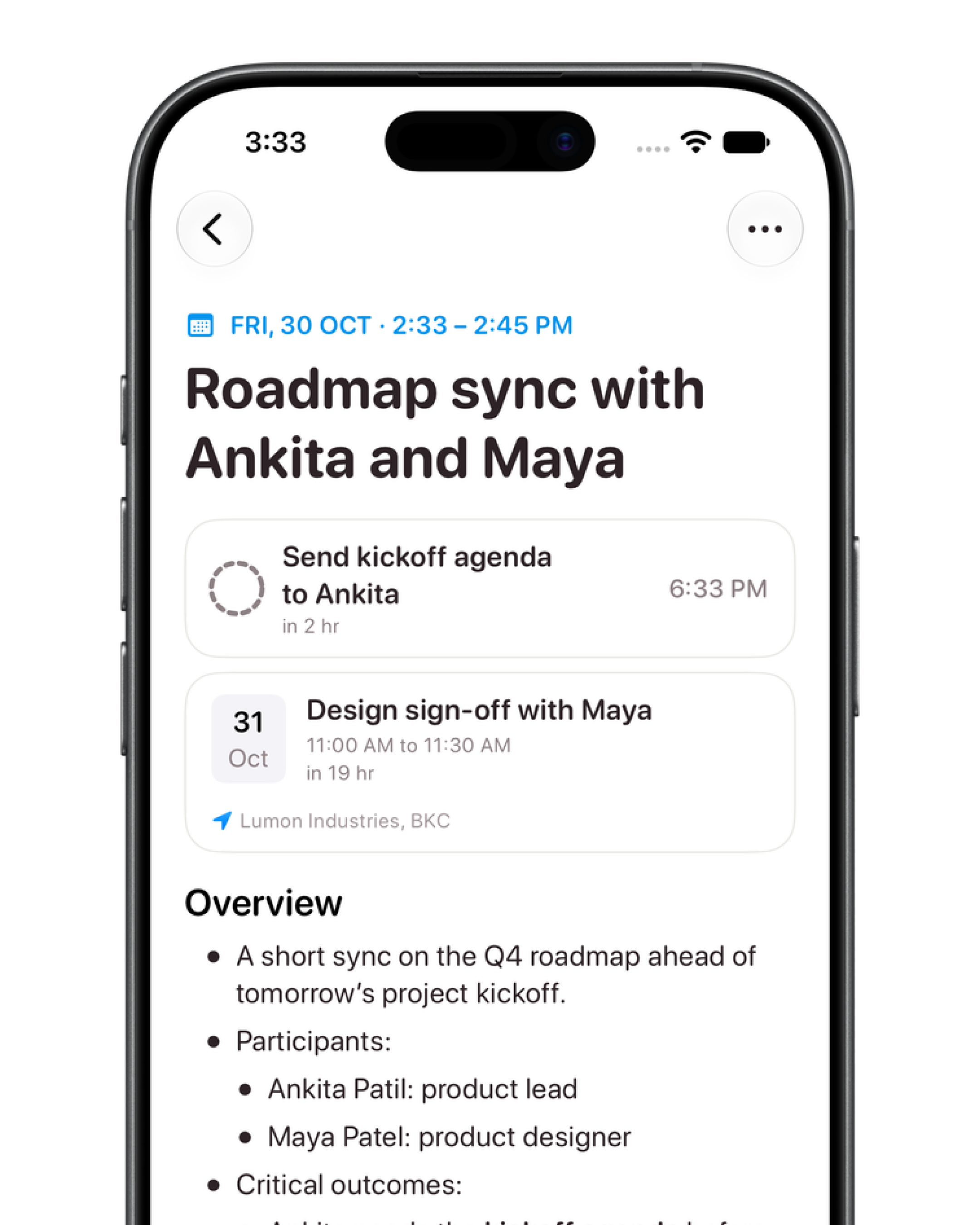
The insights show up at the top of the note, and on Home alongside the ones Halo makes from your email and calendar. Add the reminder to Reminders or the event to your calendar with a tap. Only things that are yours count: steps you own, or that someone promised you. A to-do that two other people agreed between themselves stays in the summary and off your list.
Insights stay in step with the note. If you correct the transcript and reprocess, an insight for an item you removed is archived, a changed date moves the reminder, and new action items are added. If you already changed that reminder yourself in the Reminders app, Halo leaves it alone. Delete the note, and everything made from it goes with it.
Every step, and where it runs
A recording goes through seven steps between the moment you hit stop and the moment it shows up as a finished note. Six of them happen on your iPhone. The one that does not is the summary, and even that sees only the transcript text.
- 01 · RecordOn device
Crash-safe capture to a scratch file, with a Live Activity and a Stop button.
- 02 · Clean upOn device
Apple's voice isolation runs on a temporary copy to cut background noise.
- 03 · TranscribeOn device
Apple's SpeechAnalyzer turns speech into timestamped text.
- 04 · Identify speakersOn device
FluidAudio's diarization models work out who spoke when, on the Neural Engine.
- 05 · Recognise youOn device
Your voiceprint is matched against each speaker in the recording.
- 06 · SummariseYour provider
The transcript text goes to the model you picked, never the audio.
- 07 · Index and actOn device
The note is vectorised for search, and becomes reminders and events on Home.
Each step saves its status before it starts. If the app is killed halfway through a long recording, Halo picks up from the step it was on the next time it launches, instead of starting again or losing the note.
Recordings that survive anything
A voice note is only useful if it is there when you come back to it. While you record, Halo writes raw audio to a scratch file that stays readable up to the last sample, even after a hard crash. Only once the recording is finished is it compressed and moved into your notes. If something goes wrong in between, the next launch finds the leftover file and recovers it.
Recording keeps going in the background, with a Live Activity on the Lock Screen and in the Dynamic Island so you can see the timer and stop it without opening the app. If a phone call comes in, the recording pauses and picks up afterwards. A single recording can run for up to three hours.
Transcription on your iPhone, not a server
Transcription uses Apple’s new SpeechAnalyzer, which runs entirely on device. Before it runs, Halo passes the recording through Apple’s voice isolation, on a temporary copy, so a noisy café or a fan in the room does less damage to the transcript. The original audio is never changed, and you can tune the mix in settings and preview it on your latest recording.
The language is chosen when the recording starts and saved with the note, so a retry later uses the language it was actually spoken in. Halo supports every language Apple’s on-device transcriber supports, and downloads the model the first time you use one. Summaries work in other languages too.
Who said what in the meeting
Apple’s transcriber knows what was said but not who said it. For that, Halo runs FluidAudio’s speaker diarization models on the Neural Engine. They come bundled with the app, so nothing needs to be fetched before your first note. Each stretch of text is matched to the speaker who overlaps it most, and a new line starts whenever the speaker changes or there is a pause.
Names come from the conversation itself. If someone introduces themselves or is addressed by name, the summary model suggests that name for their speaker, but nothing is renamed until you tap Apply. It never guesses a name that was not said.
The transcript is a plain, editable text file. You can fix a word, delete a line or rename a speaker everywhere, then reprocess to rebuild just the summary.
# locale: en-IN
# speakers: 2
# suggestedNames: Speaker 1=Diane
[00:00:06] Speaker 1: Hello? Oh, hello. I didn't know you were there.
[00:00:09] Speaker 2: Neither did I.
Halo learns your voice
The part I am most pleased with is that Halo learns which voice is yours. Pick “Me” for a speaker once, and Halo keeps a voiceprint for you, built from your 20 most recent samples so it adapts to new rooms and microphones. In later notes it compares every speaker with that voiceprint and links the clear match to you before the summary runs.
An automatic match only links the speaker. It does not rename them or add to your voiceprint, so one wrong guess cannot slowly drift it, and naming the speaker fixes it. Your voiceprint is stored with your notes, not on any server.
Knowing who you are is what makes the summary and its insights personal. Halo can tell the difference between “I’ll send it tonight” said by you and the same line said by someone else.
A summary from the model you choose
The summary is the one step that needs a large language model, so Halo uses yours. In Notes settings you can pick any model you have set up in Halo, separately from the one you chat with. If it fails, your fallback model takes over.
The model gets the transcript text, your name and which speaker is you. It returns a title, a short summary, chapters across the recording, the outcomes, and the action items. Very long recordings, beyond about an hour of steady talk, are condensed in sections first so nothing gets cut off.
Search and chat with your notes
Every note is split into sections and turned into vectors on your device, so you can search notes by meaning as well as by exact words, and see the matching passages under each one. The agent can search them too, so in chat you can ask what was decided in Tuesday’s meeting, or open a note and use Ask anything to ask about just that one.
Summaries of notes that involve you also feed Halo’s long-term memory, so it gets to know the people and projects you talk about. I wrote about how that memory works in How Halo remembers you.
Scheduled recording
You can also set Halo to record on a schedule, say 9 to 5 on weekdays, so you never have to remember to press record in a meeting. All-day audio picks up TV, music and other people’s conversations, so a scheduled note keeps only what you said and what was said to or with you. Media is mentioned in one line at most, and never becomes a todo or a memory about you. A scheduled recording where nothing involved you stays searchable, but creates no todos or events.
Since launch
Thank you to everyone who replied to the launch post on X. Two questions came up a lot, so here are the answers.
- Can I record from the Action Button? Yes, now you can. A Record Voice Note shortcut, a Control for Control Center and the Lock Screen, and a widget all start and stop a voice note without opening the app. Set the Action Button to the shortcut or the Control.
- What about other languages? Voice notes work in every language Apple’s on-device transcriber supports. Choose yours in Notes settings and Halo downloads the model.
I have also added Recently Deleted for notes, merging notes, importing an existing audio file from Notes settings, and better speaker identification that names the people Halo already knows in your summaries.
Voice Notes is available in Halo now. Download Halo on the App Store, and tell me what you record with it.